🎯 演示 | 📥 模型下载 | 📄 技术报告 | 🌟 Github
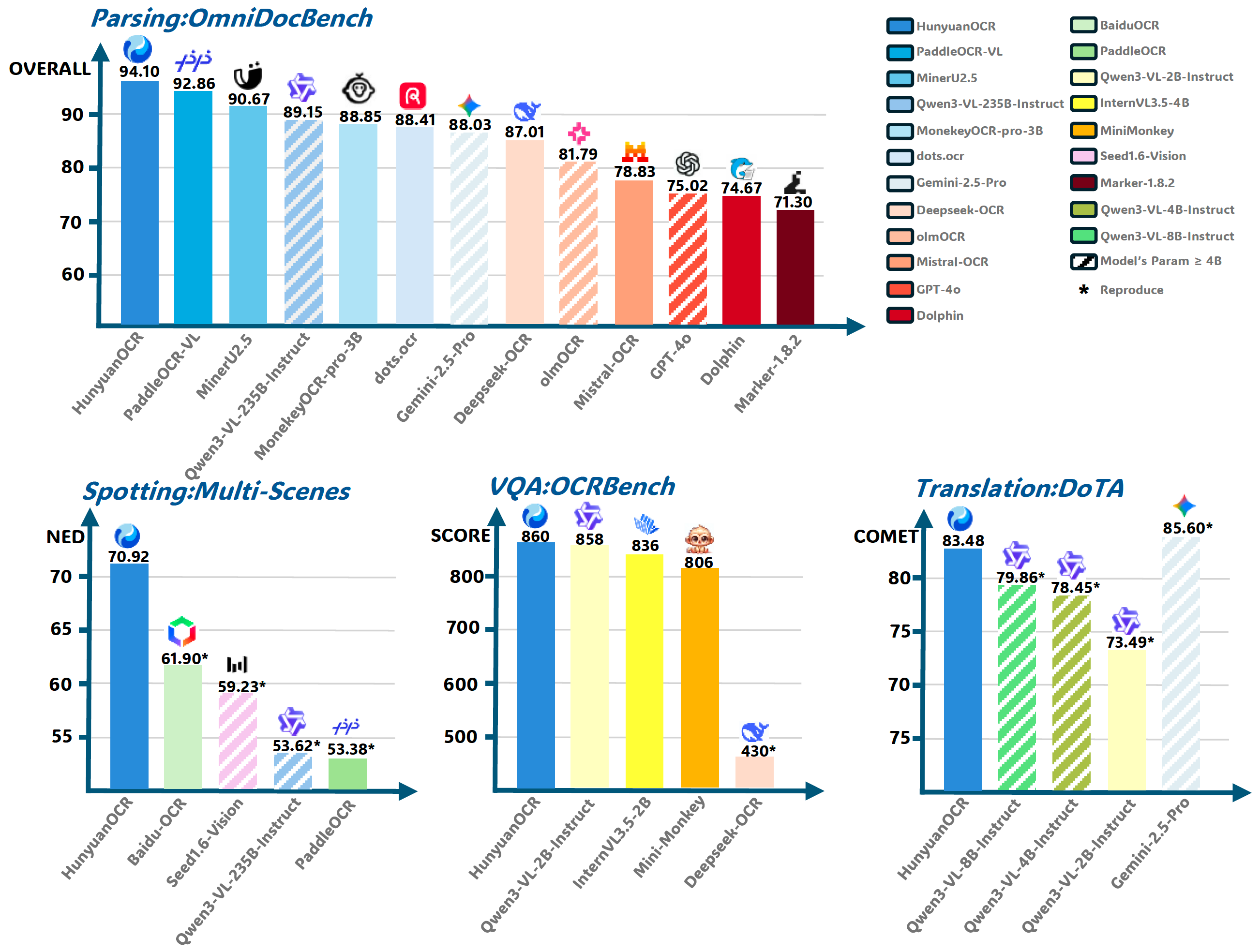
## 📖 简介 **HunyuanOCR** 是基于混元原生多模态架构打造的端到端OCR专家级视觉语言模型。凭借轻量级的10亿参数设计,该模型在多项行业基准测试中达到领先水平。它不仅精通**复杂多语言文档解析**,更在**文字定位、开放域信息抽取、视频字幕提取、图片翻译**等实际应用中表现卓越。🚀 Transformers快速上手
安装
pip install git+https://github.com/huggingface/transformers@82a06db03535c49aa987719ed0746a76093b1ec4
注意:我们稍后会将其合并到 Transformers 主分支中。
模型推理
from transformers import AutoProcessor
from transformers import HunYuanVLForConditionalGeneration
from PIL import Image
import torch

def clean_repeated_substrings(text):
    """Clean repeated substrings in text"""
    n = len(text)
    if n<8000:
        return text
    for length in range(2, n // 10 + 1):
        candidate = text[-length:]
        count = 0
        i = n - length

        while i >= 0 and text[i:i + length] == candidate:
            count += 1
            i -= length

        if count >= 10:
            return text[:n - length * (count - 1)]

    return text

model_name_or_path = "tencent/HunyuanOCR"
processor = AutoProcessor.from_pretrained(model_name_or_path, use_fast=False)
img_path = "path/to/your/image.jpg"
image_inputs = Image.open(img_path)
messages1 = [
    {


        "role": "user",
        "content": [
            {

      "type": "image", "image": img_path},
            {

      "type": "text", "text": (
                "Extract all information from the main body of the document image "
                "and represent it in markdown format, ignoring headers and footers. "
                "Tables should be expressed in HTML format, formulas in the document "
                "should be represented using LaTeX format, and the parsing should be "
                "organized according to the reading order."
            )},
        ],
    }
]
messages = [messages1]
texts = [
    processor.apply_chat_template(msg, tokenize=False, add_generation_prompt=True)
    for msg in messages
]
inputs = processor(
    text=texts,
    images=image_inputs,
    padding=True,
    return_tensors="pt",
)
model = HunYuanVLForConditionalGeneration.from_pretrained(
    model_name_or_path,
    attn_implementation="eager",
    dtype=torch.bfloat16,
    device_map="auto"
)
with torch.no_grad():
    device = next(model.parameters()).device
    inputs = inputs.to(device)
    generated_ids = model.generate(**inputs, max_new_tokens=16384, do_sample=False)
if "input_ids" in inputs:
    input_ids = inputs.input_ids
else:
    print("inputs: # fallback", inputs)
    input_ids = inputs.inputs
generated_ids_trimmed = [
    out_ids[len(in_ids):] for in_ids, out_ids in zip(input_ids, generated_ids)
]
output_texts = clean_repeated_substrings(processor.batch_decode(
    generated_ids_trimmed, skip_special_tokens=True, clean_up_tokenization_spaces=False
))
print(output_texts)
🚀 vLLM 快速入门
查看 vLLM 混元OCR 使用指南。
安装
使用 pip:
pip install vllm --pre --extra-index-url https://wheels.vllm.ai/nightly
使用uv:
uv pip install vllm --extra-index-url https://wheels.vllm.ai/nightly
模型推理
from vllm import LLM, SamplingParams
from PIL import Image
from transformers import AutoProcessor

model_path = "tencent/HunyuanOCR"
llm = LLM(model=model_path, trust_remote_code=True)
processor = AutoProcessor.from_pretrained(model_path)
sampling_params = SamplingParams(temperature=0, max_tokens=16384)

img_path = "/path/to/image.jpg"
img = Image.open(img_path)
messages = [
    {

      "role": "user", "content": [
        {

      "type": "image", "image": img_path},
        {

      "type": "text", "text": "Detect and recognize text in the image, and output the text coordinates in a formatted manner."}
    ]}
]
prompt = processor.apply_chat_template(messages, tokenize=False, add_generation_prompt=True)
inputs = {

      "prompt": prompt, "multi_modal_data": {

      "image": [img]}}
output = llm.generate([inputs], sampling_params)[0]
print(output.outputs[0].text)
💬 应用导向提示
| 任务 | 英文 | 中文 |
|---|---|---|
| 发现 | Detect and recognize text in the image, and output the text coordinates in a formatted manner. | 检测并识别图片中的文字,将文本坐标格式化输出。 |
| 解析 | • Identify the formula in the image and represent it using LaTeX format. • Parse the table in the image into HTML. • Parse the chart in the image; use Mermaid format for flowcharts and Markdown for other charts. • Extract all information from the main body of the document image and represent it in markdown format, ignoring headers and footers. Tables should be expressed in HTML format, formulas in the document should be represented using LaTeX format, and the parsing should be organized according to the reading order. |
• 识别图片中的公式,用 LaTeX 格式表示。 • 把图中的表格解析为 HTML。 • 解析图中的图表,对于流程图使用 Mermaid 格式表示,其他图表使用 Markdown 格式表示。 • 提取文档图片中正文的所有信息用 markdown 格式表示,其中页眉、页脚部分忽略,表格用 html 格式表达,文档中公式用 latex 格式表示,按照阅读顺序组织进行解析。 |
| 信息提取 | • Output the value of Key. • Extract the content of the fields: [‘key1’,‘key2’, …] from the image and return it in JSON format. • Extract the subtitles from the image. |
• 输出 Key 的值。 • 提取图片中的: [‘key1’,‘key2’, …] 的字段内容,并按照 JSON 格式返回。 • 提取图片中的字幕。 |
| 翻译 | First extract the text, then translate the text content into English. If it is a document, ignore the header and footer. Formulas should be represented in LaTeX format, and tables should be represented in HTML format. | 先提取文字,再将文字内容翻译为英文。若是文档,则其中页眉、页脚忽略。公式用latex格式表示,表格用html格式表示。 |
🙏 致谢
我们要感谢 PaddleOCR、MinerU、MonkeyOCR、DeepSeek-OCR、dots.ocr 提供的宝贵模型与创意。
同时,我们感谢以下基准测试:OminiDocBench、OCRBench、DoTA。