一、创建下面的目录结构
.
├──  packages
│   ├── apps  #该目录用于存放各端应用壳工程
│   ├── common #该目录用于存放公共库,均为纯 dart 代码,不依赖于 ios/android 等原生实现
│   │   ├── domains #领域对象,存放各类实体文件,如枚举/模型/vo/事件等
│   │   ├── extensions #存放扩展类文件,对于类的扩展方法/属性
│   │   ├── services #服务类:如请求服务/授权服务/缓存服务/平台调用服务/路由服务/工具类等
│   │   └── widgets #通用小型 widgets, 纯dart编写的 Flutter UI 组件
│   ├── components #封装组件库,可以依赖于第三方库/第三方插件,或依赖于 plugins中的插件
│   │   ├── image_uploader
│   │   └── player
│   ├── modules
│   │   ├── address
│   │   ├── home
│   │   ├── me
│   │   ├── message
│   │   ├── order
│   │   ├── shop
│   │   └── support
│   └── plugins #插件库,自行封装的插件库,依赖于原生平台(ios/android)的代码
│       └── printer
├── README.md
├── melos.yaml
└── pubspec.yaml
我的项目初始结构如下:
.
├──  packages
│   ├── apps  #该目录用于存放各端应用壳工程
│   ├── common #该目录用于存放公共库,均为纯 dart 代码,不依赖于 ios/android 等原生实现
│   │   ├── domains #领域对象,存放各类实体文件,如枚举/模型/vo/事件等
│   │   ├── extensions #存放扩展类文件,对于类的扩展方法/属性
│   │   ├── services #服务类:如请求服务/授权服务/缓存服务/平台调用服务/路由服务/工具类等
│   │   └── widgets #通用小型 widgets, 纯dart编写的 Flutter UI 组件
│   ├── components #封装组件库,可以依赖于第三方库/第三方插件,或依赖于 plugins中的插件
│   ├── modules
│   │   ├── home
│   │   └── me
│   └── plugins #插件库,自行封装的插件库,依赖于原生平台(ios/android)的代码
├── README.md
├── melos.yaml
└── pubspec.yaml
二、分别安装官方的 flutter 3.22.0 sdk 和鸿蒙版本的 flutter 3.22.0 sdk
项目根目录的pubspec.yaml 中写下面内容
name: your_app

environment:
  sdk: '>=3.4.0 <4.0.0'
dev_dependencies:
melos: ^3.4.0根据我的上一篇文章进行操作,并且在项目根目录应用官方的 3.22.0 版本 flutter sdk
三、把 melos 这个 Dart 工具包安装为全局命令行工具
运行下面命令
dart pub global activate melos--- 输出下面内容
xxx@xxxdeMacBook-Pro ~ % dart pub global activate melos
The Dart CLI developer tool uses Google Analytics to report usage and diagnostic
data along with package dependencies, and crash reporting to send basic crash
reports. This data is used to help improve the Dart platform, Flutter framework,
and related tools.

Telemetry is not sent on the very first run. To disable reporting of telemetry,
run this terminal command:

    dart --disable-analytics

If you opt out of telemetry, an opt-out event will be sent, and then no further
information will be sent. This data is collected in accordance with the Google
Privacy Policy (https://policies.google.com/privacy).

Downloading packages... .
+ ansi_styles 0.3.2+1
+ args 2.7.0
+ async 2.13.0
+ charcode 1.4.0
+ checked_yaml 2.0.3 (2.0.4 available)
+ cli_launcher 0.3.1
+ cli_util 0.4.2
+ clock 1.1.2
+ collection 1.19.1
+ conventional_commit 0.6.0+1 (0.6.1+1 available)
+ file 7.0.1
+ glob 2.1.3
+ graphs 2.3.2
+ http 1.4.0
+ http_parser 4.1.2
+ intl 0.19.0 (0.20.2 available)
+ io 1.0.5
+ json_annotation 4.9.0
+ melos 6.3.2 (6.3.3 available)
+ meta 1.16.0 (1.17.0 available)
+ mustache_template 2.0.0
+ path 1.9.1
+ platform 3.1.6
+ pool 1.5.1
+ process 5.0.3 (5.0.4 available)
+ prompts 2.0.0
+ pub_semver 2.2.0
+ pub_updater 0.4.0 (0.5.0 available)
+ pubspec_parse 1.4.0 (1.5.0 available)
+ source_span 1.10.1
+ stack_trace 1.12.1
+ string_scanner 1.4.1
+ term_glyph 1.2.2
+ typed_data 1.3.2 (1.4.0 available)
+ web 1.1.1
+ yaml 3.1.3
+ yaml_edit 2.2.2
Building package executables... (1.2s)
Built melos:melos.
Installed executable melos.
Activated melos 6.3.2.
--- 运行下面命令,出现版本号,则为成功
melos --version四、初始化各个模块
1. 在各个 package 做代码的初始化,如在 packages/common/domains 目录运行
fvm flutter create --template package .2. 标准的APP壳工程搭建
(1)Android 和 iOS 壳工程搭建
--- 我们要用 jdk17 来构建 flutter app,首先进入Android Studio 修改其构建的 JDK为 17,为了方便后续的App运行测试
先找到 settings
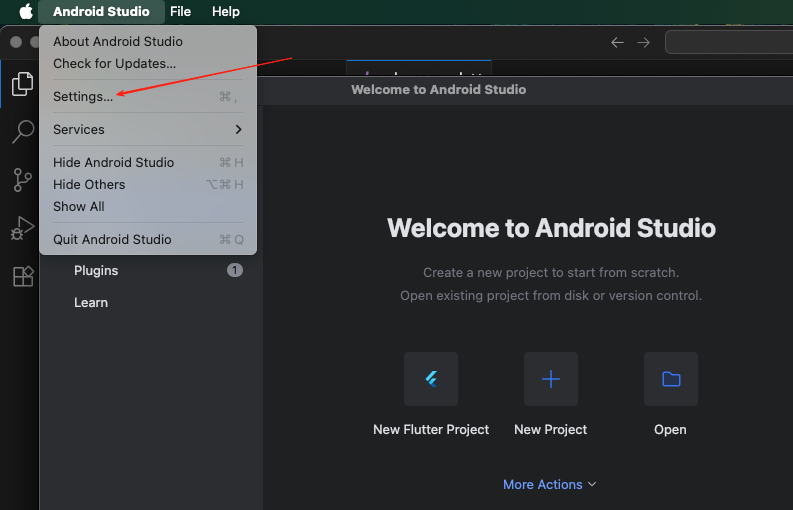
根据下图引导 更改 jdk 为17版本(前提本地要有这个版本,没有的话可以自己下载一个)
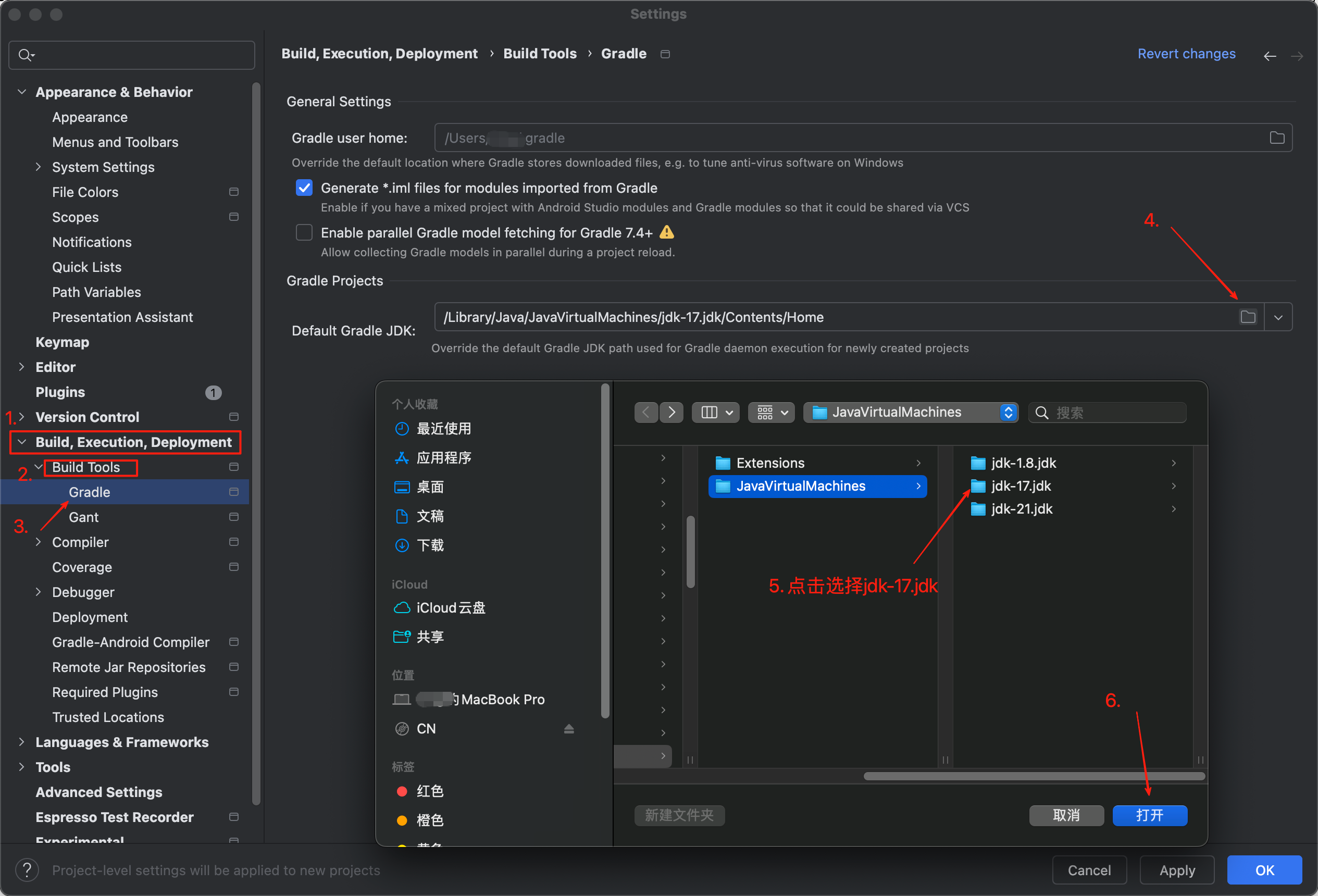
(由于 flutter 创建app会优先找 Android Studio 安装目录下的内置 jdk 版本,不会先找本地的环境变量,这就导致 jdk21 这个版本和当前的gradle版本不兼容,所以我们后续要做一些操作去更改构建时的 jdk 版本为17)
--- 进入 packages/apps 目录,执行下面命令,xxx 替换为自己项目的域名
fvm flutter create --template app --org com.xxx.flutter app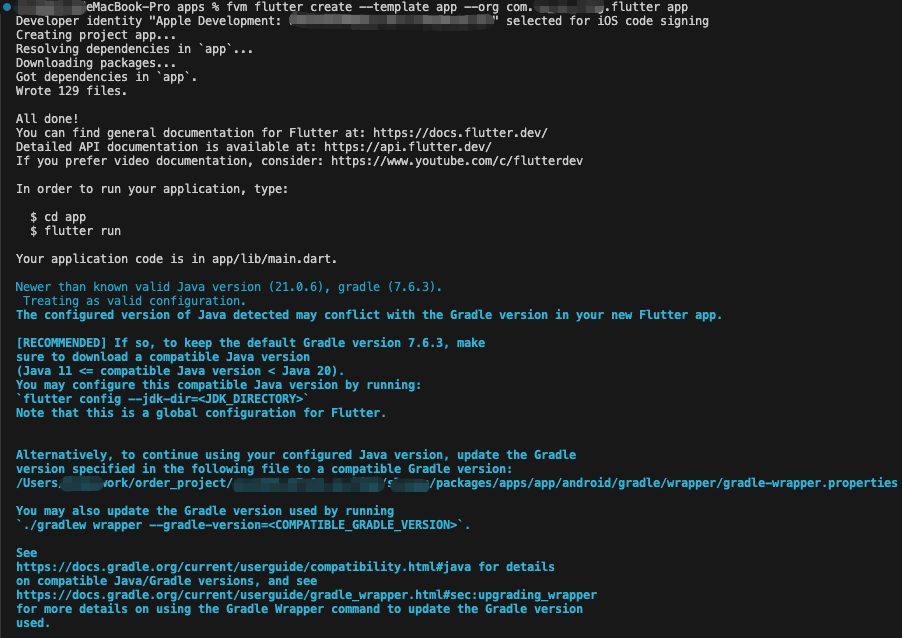
name: app
description: "A new Flutter project."
# The following line prevents the package from being accidentally published to
# pub.dev using `flutter pub publish`. This is preferred for private packages.
publish_to: 'none' # Remove this line if you wish to publish to pub.dev

# The following defines the version and build number for your application.
# A version number is three numbers separated by dots, like 1.2.43
# followed by an optional build number separated by a +.
# Both the version and the builder number may be overridden in flutter
# build by specifying --build-name and --build-number, respectively.
# In Android, build-name is used as versionName while build-number used as versionCode.
# Read more about Android versioning at https://developer.android.com/studio/publish/versioning
# In iOS, build-name is used as CFBundleShortVersionString while build-number is used as CFBundleVersion.
# Read more about iOS versioning at
# https://developer.apple.com/library/archive/documentation/General/Reference/InfoPlistKeyReference/Articles/CoreFoundationKeys.html
# In Windows, build-name is used as the major, minor, and patch parts
# of the product and file versions while build-number is used as the build suffix.
version: 1.0.0+1

environment:
  sdk: '>=3.4.0 <4.0.0'

# Dependencies specify other packages that your package needs in order to work.
# To automatically upgrade your package dependencies to the latest versions
# consider running `flutter pub upgrade --major-versions`. Alternatively,
# dependencies can be manually updated by changing the version numbers below to
# the latest version available on pub.dev. To see which dependencies have newer
# versions available, run `flutter pub outdated`.
dependencies:
  flutter:
    sdk: flutter
  # The following adds the Cupertino Icons font to your application.
  # Use with the CupertinoIcons class for iOS style icons.
  cupertino_icons: ^1.0.6

  # 服务
  services:
    path: '../../common/services'

  # 领域对象
  domains:
    path: '../../common/domains'

  # 纯Dart小组件
  widgets:
    path: '../../common/widgets'

  # 首页
  home:
    path: '../../modules/home'

  # 我的
  me:
    path: '../../modules/me'

dev_dependencies:
  flutter_test:
    sdk: flutter

  # The "flutter_lints" package below contains a set of recommended lints to
  # encourage good coding practices. The lint set provided by the package is
  # activated in the `analysis_options.yaml` file located at the root of your
  # package. See that file for information about deactivating specific lint
  # rules and activating additional ones.
  flutter_lints: ^3.0.0

# For information on the generic Dart part of this file, see the
# following page: https://dart.dev/tools/pub/pubspec

# The following section is specific to Flutter packages.
flutter:

  # The following line ensures that the Material Icons font is
  # included with your application, so that you can use the icons in
  # the material Icons class.
  uses-material-design: true

  # To add assets to your application, add an assets section, like this:
  # assets:
  #   - images/a_dot_burr.jpeg
  #   - images/a_dot_ham.jpeg

  # An image asset can refer to one or more resolution-specific "variants", see
  # https://flutter.dev/assets-and-images/#resolution-aware

  # For details regarding adding assets from package dependencies, see
  # https://flutter.dev/assets-and-images/#from-packages

  # To add custom fonts to your application, add a fonts section here,
  # in this "flutter" section. Each entry in this list should have a
  # "family" key with the font family name, and a "fonts" key with a
  # list giving the asset and other descriptors for the font. For
  # example:
  # fonts:
  #   - family: Schyler
  #     fonts:
  #       - asset: fonts/Schyler-Regular.ttf
  #       - asset: fonts/Schyler-Italic.ttf
  #         style: italic
  #   - family: Trajan Pro
  #     fonts:
  #       - asset: fonts/TrajanPro.ttf
  #       - asset: fonts/TrajanPro_Bold.ttf
  #         weight: 700
  #
  # For details regarding fonts from package dependencies,
  # see https://flutter.dev/custom-fonts/#from-packages
--- 安装依赖
在当前目录运行下面命令,安装依赖
fvm flutter pub get(2)鸿蒙壳工程搭建
--- 在项目根目录切换鸿蒙版本的 flutter sdk
首先运行下面命令,打印出当前的 flutter 版本
fvm list输出示例如下
Cache directory:  /Users/xxx/fvm/versions
Directory Size: 7.22 GB

┌───────────────────┬─────────┬───────────────────┬──────────────┬──────────────┬────────┬───────┐
│ Version           │ Channel │ Flutter Version   │ Dart Version │ Release Date │ Global │ Local │
├───────────────────┼─────────┼───────────────────┼──────────────┼──────────────┼────────┼───────┤
│ 3.22.1-ohos-1.0.4 │         │ 3.22.1-ohos-1.0.4 │ 3.4.0        │              │        │       │
├───────────────────┼─────────┼───────────────────┼──────────────┼──────────────┼────────┼───────┤
│ 3.22.0            │ stable  │ 3.22.0            │ 3.4.0        │ May 13, 2024 │ ●      │ ●     │
└───────────────────┴─────────┴───────────────────┴──────────────┴──────────────┴────────┴───────┘
根据你的 flutter 鸿蒙版本名称 运行下面的命令
fvm use 3.22.1-ohos-1.0.4输出示例如下
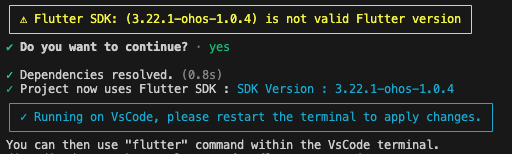
运行下面命令,确保 flutter 版本已经切换到鸿蒙版本
fvm flutter --version输出示例如下,则为切换成功

--- 进入 packages/apps 目录,执行下面命令,xxx 替换为自己项目的域名
fvm flutter create --template app --platforms ohos --org com.xxx.flutter ohos_app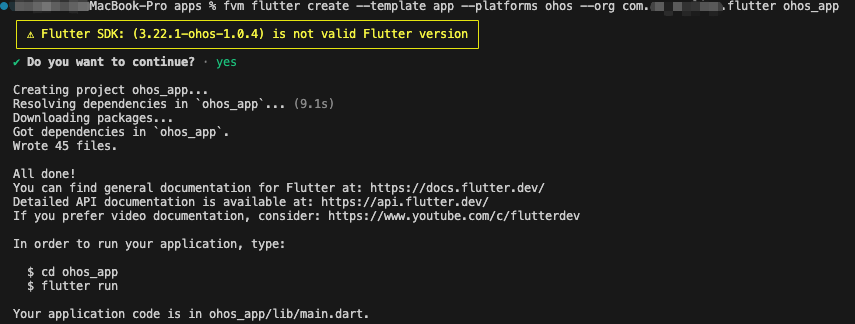
--- 修改 packages/apps/ohos_app 目录中的 pubspec.yaml ,增加依赖项
name: ohos_app
description: "A new Flutter project."
# The following line prevents the package from being accidentally published to
# pub.dev using `flutter pub publish`. This is preferred for private packages.
publish_to: 'none' # Remove this line if you wish to publish to pub.dev

# The following defines the version and build number for your application.
# A version number is three numbers separated by dots, like 1.2.43
# followed by an optional build number separated by a +.
# Both the version and the builder number may be overridden in flutter
# build by specifying --build-name and --build-number, respectively.
# In Android, build-name is used as versionName while build-number used as versionCode.
# Read more about Android versioning at https://developer.android.com/studio/publish/versioning
# In iOS, build-name is used as CFBundleShortVersionString while build-number is used as CFBundleVersion.
# Read more about iOS versioning at
# https://developer.apple.com/library/archive/documentation/General/Reference/InfoPlistKeyReference/Articles/CoreFoundationKeys.html
# In Windows, build-name is used as the major, minor, and patch parts
# of the product and file versions while build-number is used as the build suffix.
version: 1.0.0+1

environment:
  sdk: '>=3.4.0 <4.0.0'

# Dependencies specify other packages that your package needs in order to work.
# To automatically upgrade your package dependencies to the latest versions
# consider running `flutter pub upgrade --major-versions`. Alternatively,
# dependencies can be manually updated by changing the version numbers below to
# the latest version available on pub.dev. To see which dependencies have newer
# versions available, run `flutter pub outdated`.
dependencies:
  flutter:
    sdk: flutter
  # The following adds the Cupertino Icons font to your application.
  # Use with the CupertinoIcons class for iOS style icons.
  cupertino_icons: ^1.0.6

  # 服务
  services:
    path: '../../common/services'

  # 领域对象
  domains:
    path: '../../common/domains'

  # 纯Dart小组件
  widgets:
    path: '../../common/widgets'

  # 首页
  home:
    path: '../../modules/home'

  # 我的
  me:
    path: '../../modules/me'

dev_dependencies:
  flutter_test:
    sdk: flutter

  # The "flutter_lints" package below contains a set of recommended lints to
  # encourage good coding practices. The lint set provided by the package is
  # activated in the `analysis_options.yaml` file located at the root of your
  # package. See that file for information about deactivating specific lint
  # rules and activating additional ones.
  flutter_lints: ^3.0.0

# For information on the generic Dart part of this file, see the
# following page: https://dart.dev/tools/pub/pubspec

# The following section is specific to Flutter packages.
flutter:

  # The following line ensures that the Material Icons font is
  # included with your application, so that you can use the icons in
  # the material Icons class.
  uses-material-design: true

  # To add assets to your application, add an assets section, like this:
  # assets:
  #   - images/a_dot_burr.jpeg
  #   - images/a_dot_ham.jpeg

  # An image asset can refer to one or more resolution-specific "variants", see
  # https://flutter.dev/assets-and-images/#resolution-aware

  # For details regarding adding assets from package dependencies, see
  # https://flutter.dev/assets-and-images/#from-packages

  # To add custom fonts to your application, add a fonts section here,
  # in this "flutter" section. Each entry in this list should have a
  # "family" key with the font family name, and a "fonts" key with a
  # list giving the asset and other descriptors for the font. For
  # example:
  # fonts:
  #   - family: Schyler
  #     fonts:
  #       - asset: fonts/Schyler-Regular.ttf
  #       - asset: fonts/Schyler-Italic.ttf
  #         style: italic
  #   - family: Trajan Pro
  #     fonts:
  #       - asset: fonts/TrajanPro.ttf
  #       - asset: fonts/TrajanPro_Bold.ttf
  #         weight: 700
  #
  # For details regarding fonts from package dependencies,
  # see https://flutter.dev/custom-fonts/#from-packages
五、通过 melos 初始化 flutter 多包项目
--- 进入项目根目录
1. 在 melos.yaml 文件中写入下面内容
name: your_app

packages:
  - packages/**

scripts:
  analyze:
    exec: dart analyze .
  dependency_validator:
    exec: flutter pub run dependency_validator

  dart_code_linter:
    run: |
      melos exec -c 1 --ignore="*example*" -- \
        flutter pub run dart_code_linter:metrics analyze lib
    description: |
      Run `dart_code_linter` in all packages.
      - Note: you can also rely on your IDEs Dart Analysis / Issues window.

  cp-lint-options:
    run: |
      melos exec -c 1 --ignore="*example*" -- \
      cp  $(PWD)/analysis_options.yaml analysis_options.yaml

sdkPath: .fvm/flutter_sdk
2. 在项目根目录运行下面命令 进行初始化
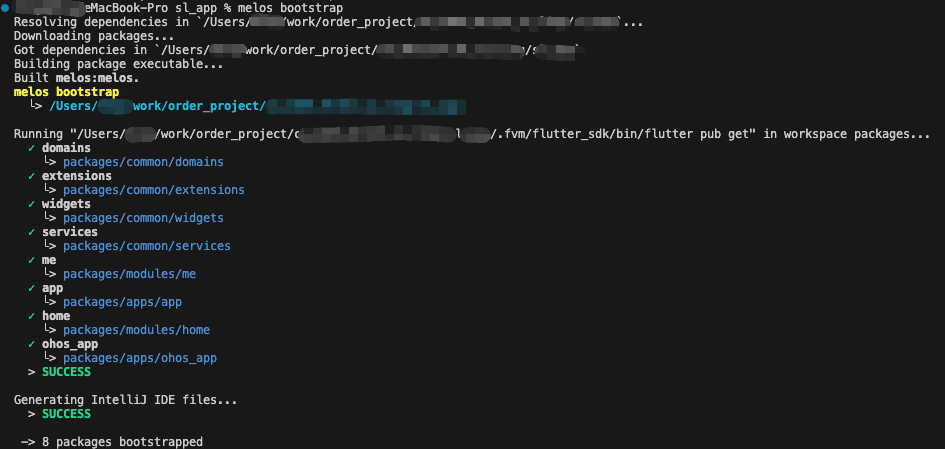
melos bootstrap出现下面内容,则表示初始化成功