c#专栏记录:
前言
日常项目记录,看的b站某up主的啦
项目介绍:实现 文件树
App.xaml
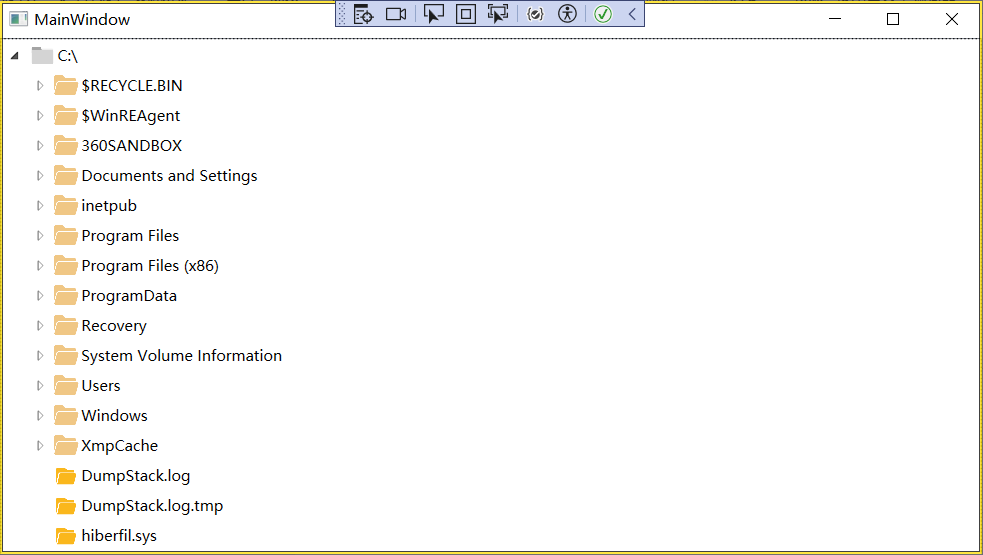

<Application x:Class="Wpf_desktop.App"
             xmlns="http://schemas.microsoft.com/winfx/2006/xaml/presentation"
             xmlns:x="http://schemas.microsoft.com/winfx/2006/xaml"
             xmlns:local="clr-namespace:Wpf_desktop"
             StartupUri="MainWindow.xaml">
    <Application.Resources>

    </Application.Resources>
</Application>
AssemblyInfo.cs
using System.Windows;

[assembly: ThemeInfo(
    ResourceDictionaryLocation.None,            //where theme specific resource dictionaries are located
                                                //(used if a resource is not found in the page,
                                                // or application resource dictionaries)
    ResourceDictionaryLocation.SourceAssembly   //where the generic resource dictionary is located
                                                //(used if a resource is not found in the page,
                                                // app, or any theme specific resource dictionaries)
)]
HeaderToImageConverter.cs
using System;
using System.Globalization;
using System.IO;
using System.Windows.Data;
using System.Windows.Media.Imaging;

namespace Wpf_desktop
{


    //converts a full path to a specific image type of a drive, folder oe file
    [ValueConversion(typeof(string), typeof(BitmapImage))]

    public class HeaderToImageConverter: IValueConverter
    {


        public static HeaderToImageConverter Instance = new HeaderToImageConverter();
        public object Convert(object value, Type targetType, object parameter, System.Globalization.CultureInfo culture)
        {


            //get the file name
            var path = (string)value;


            //get the name of the file
            var name = MainWindow.GetFileFolderName(path);
            //by default ,we presume an image
            var image = "/Image/open-folder.png";

            //IF the name is blank , we presume it's a drive as
            if(string.IsNullOrEmpty(name))
                image = "/Image/gary-folder.png";
            else if (new FileInfo(path).Attributes.HasFlag(FileAttributes.Directory))
                image = "/Image/folder.png";

            return new BitmapImage(new Uri($"C:/Users/Administrator/source/repos/Wpf_desktop{

        image}"));
        }

        public object ConvertBack(object value, Type targetType, object parameter, CultureInfo culture)
        {


            throw new NotImplementedException();
        }
    }
}
MainWindow.xaml
<Window x:Class="Wpf_desktop.MainWindow"
        xmlns="http://schemas.microsoft.com/winfx/2006/xaml/presentation"
        xmlns:x="http://schemas.microsoft.com/winfx/2006/xaml"
        xmlns:d="http://schemas.microsoft.com/expression/blend/2008"
        xmlns:mc="http://schemas.openxmlformats.org/markup-compatibility/2006"
        xmlns:local="clr-namespace:Wpf_desktop"
        Loaded="Window_Loaded"
        mc:Ignorable="d"
        Title="MainWindow" Height="450" Width="800">
    <StackPanel>


        <TreeView x:Name="FolderView">
            <TreeView.Resources>
                <Style TargetType="{x:Type TreeViewItem}">
                    <Setter Property="HeaderTemplate" >
                        <Setter.Value>
                            <DataTemplate>
                                <StackPanel Orientation="Horizontal">
                                    <Image Width="20" Margin="2"
                                           Source="{

      Binding RelativeSource={

      RelativeSource Mode=FindAncestor, AncestorType={

      x:Type TreeViewItem}},
                                        Path=Tag,
                                        Converter={

      x:Static local:HeaderToImageConverter.Instance}}"/>
                                    <TextBlock VerticalAlignment="Center" FontStyle="Normal" Text="{Binding}"></TextBlock>
                                </StackPanel>
                            </DataTemplate>
                        </Setter.Value>
                    </Setter>
                </Style>
            </TreeView.Resources>
        </TreeView>
    </StackPanel>
</Window>
MainWindow.xaml.cs
using System.Collections.Generic;
using System.IO;
using System.Reflection.PortableExecutable;
using System.Windows;
using System.Windows.Controls;
namespace Wpf_desktop
{


    /// <summary>
    /// Interaction logic for MainWindow.xaml
    /// </summary>
    public partial class MainWindow : Window
    {


        #region Constructor

        /// <summary>
        /// Default constructor
        /// </summary>
        public MainWindow()
        {


            InitializeComponent();
        }

        #endregion

        #region On Loaded

        /// <summary>
        /// When the application first opens
        /// </summary>
        /// <param name="sender"></param>
        /// <param name="e"></param>
        private void Window_Loaded(object sender, RoutedEventArgs e)
        {


            // Get every logical drive on the machine
            foreach (var drive in Directory.GetLogicalDrives())
            {


                // Create a new item for it
                var item = new TreeViewItem()
                {


                    // Set the header
                    Header = drive,
                    // And the full path
                    Tag = drive
                };

                // Add a dummy item
                item.Items.Add(null);

                // Listen out for item being expanded
                item.Expanded += Folder_Expanded;

                // Add it to the main tree-view
                FolderView.Items.Add(item);
            }
        }

        #endregion

        #region Folder Expanded

        /// <summary>
        /// When a folder is expanded, find the sub folders/files
        /// </summary>
        /// <param name="sender"></param>
        /// <param name="e"></param>
        private void Folder_Expanded(object sender, RoutedEventArgs e)
        {


            #region Initial Checks

            var item = (TreeViewItem)sender;

            // If the item only contains the dummy data
            if (item.Items.Count != 1 || item.Items[0] != null)
                return;

            // Clear dummy data
            item.Items.Clear();

            // Get full path
            var fullPath = (string)item.Tag;

            #endregion

            #region Get Folders

            // Create a blank list for directories
            var directories = new List<string>();

            // Try and get directories from the folder
            // ignoring any issues doing so
            try
            {


                var dirs = Directory.GetDirectories(fullPath);

                if (dirs.Length > 0)
                    directories.AddRange(dirs);
            }
            catch {

       }

            // For each directory...
            directories.ForEach(directoryPath =>
            {


                // Create directory item
                var subItem = new TreeViewItem()
                {


                    // Set header as folder name
                    Header = GetFileFolderName(directoryPath),
                    // And tag as full path
                    Tag = directoryPath
                };

                // Add dummy item so we can expand folder
                subItem.Items.Add(null);

                // Handle expanding
                subItem.Expanded += Folder_Expanded;

                // Add this item to the parent
                item.Items.Add(subItem);
            });

            #endregion

            #region Get Files

            //create a blank list for folders
            var files = new List<string>();

            //Try and get files from the folder ignoring any issues doing so
            try
            {


                var fs = Directory.GetFiles(fullPath);
                if (fs.Length > 0)
                    files.AddRange(fs);
            }
            catch {

       }
            // for each file..
            files.ForEach(filePath =>
            {


                var subItem = new TreeViewItem()
                {


                    //set header as file name
                    Header = GetFileFolderName(filePath),
                    Tag = filePath
                };
                item.Items.Add(subItem);
            });


        }

        #endregion

        #region Helpers
        public static string GetFileFolderName(string path)
        {


            if (string.IsNullOrEmpty(path))
                return string.Empty;
            //make all slashes bace slashes
            var normalizedPath = path.Replace('/', '\\');
            //Find the last backslash in the path
            var lastIndex = normalizedPath.LastIndexOf('\\');
            //if WE DON'T find a backslash, return the path itsets
            if (lastIndex <= 0)
                return path;
            //return the name after the last backslash
            return path.Substring(lastIndex + 1);
        }
        #endregion
    }
    #endregion
}
知识内容
WPF
TreeView 文件视图
总结
阿巴阿巴!!!!
致谢
靠咖啡续命的牛马,👍点赞 📁 关注 💬评论 💰打赏。
参考
[1] deepseek等ai
往期回顾
- 无,新手上车